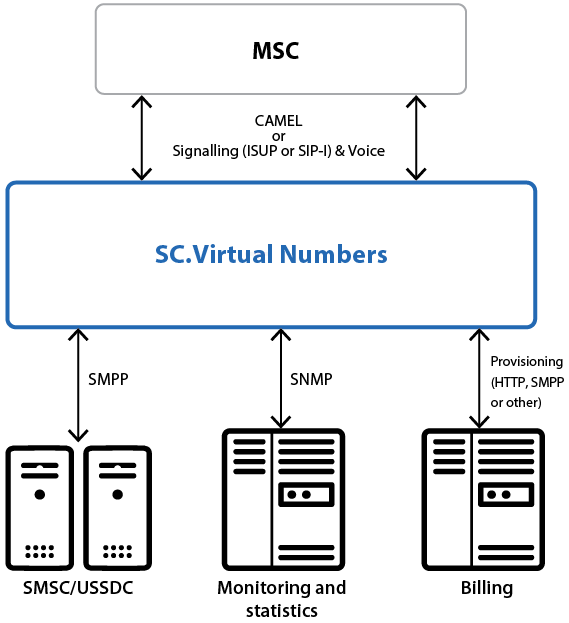
The SC.Soft company introduces the SC.Virtual Numbers platform. This solution allows providing additional virtual numbers not only to subscribers of the home network but to subscribers of other networks as well. These virtual numbers can be used for both making and receiving phone calls, and for sending and receiving SMS messages. Furthermore, subscribers can get new phone numbers without leaving their home or office, with no need to get a new SIM card.
Key features
-
Provide virtual numbers for home subscribers and for subscribers of external networks. The number could be chosen automatically or manually by the subscriber
-
Process outgoing calls and SMS sent from virtual numbers
A prefix has to be dialed before the number. The platform removes the prefix and replaces the number of the caller with the virtual number. The primary number will not appear to the called subscriber -
IVR portal for making outgoing calls from external network virtual numbers. Paid service can be managed by content providers
-
Processing incoming calls and SMS
In order to identify that a call or SMS was sent to a virtual number, a prefix has to be added to the calling number. If the subscriber uses several virtual numbers, the prefix can help determine which one -
Number reservation
After turning off a virtual number, it can be reserved by the operator for a certain period of time. During this period the number can be restored by the same subscriber -
SMS notifications to subscribers
Providing service information, such as expiration date, or on/off notifications. Notifications can be in several languages -
Managing service via SMS or USSD
-
Administrative web interface
Benefits & advantages
-
Subscribers don’t need to buy any additional SIM cards
-
Possibility to provide this service for external network subscribers
-
Increase in subscriber’s loyalty
-
Increasing incoming calls from external networks
-
Possibility for a subscriber to use multiple virtual numbers
-
Easily manage user’s virtual numbers
-
Simple integration with any billing system
Integration scheme
Integration available in two ways:
-
Using IN/CAMEL
-
Without using IN/CAMEL